

Access Control Lists
Businesses often face risks from accidental or unauthorised access, leading to data breaches or disruptions. An Access Control List provides a clear way to define who can and cannot access important systems, files and data.
Many organisations face the challenge of balancing productivity with robust security and companies often struggle with managing user permissions across multiple platforms. We have supported clients by implementing Access Control Lists that reduce confusion and eliminate overlapping access rights, ensuring that every employee has the correct level of access, strengthening security and improving efficiency.

Access Control Lists Made Easy
Clients often tell us that security controls felt complex before working with us. Our Access Control List solutions make it simple for managers to oversee permissions without needing technical expertise. This clarity has built trust among staff and reduced mistakes that could have put data at risk.
We have helped businesses simplify their security by introducing Access Control Lists that are easy to manage, where clear permission settings have reduced the workload for HR and management teams, while improving accuracy.
Access Control Lists with ITERTECH

Safeguarded
Our solutions ensure that sensitive files, systems and applications are shielded from unauthorised access and businesses benefit from a resilient security framework that defends against evolving risks while keeping operations running smoothly.

Streamlined
Many organisations come to us after struggling with fragmented or outdated access policies. Our Access Control List expertise has helped them consolidate permissions that are clear, consistent and easy to maintain.

Compliant
By clearly defining who can access sensitive information, companies are able to demonstrate strong data governance during inspections and audits, making it easier to align with GDPR, ISO standards and sector-specific regulations.
Get Started with Access Control List Services
Give ITERTECH a call to see if an Access Control List is right for you and your business.

Access Control List Benefits
File Security
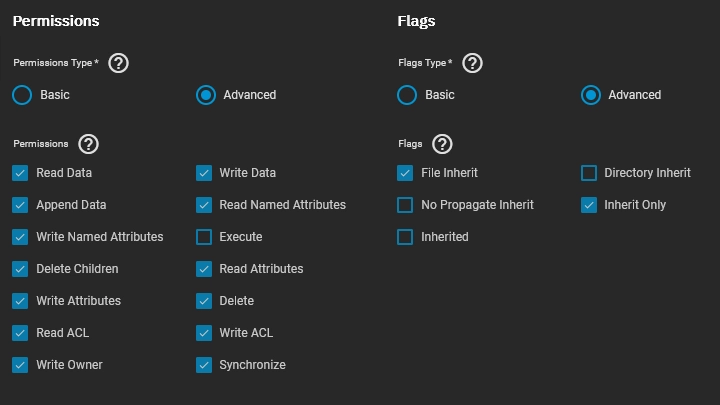
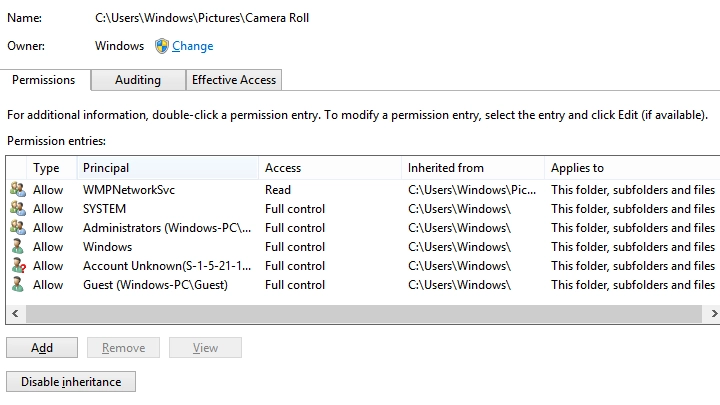
Access Control Lists (ACLs) define fine-grained permissions on files and directories. Instead of relying only on basic user/group/other permission sets, ACLs allow multiple entries where each user or group is assigned specific access rights, on Windows environments, ACLs form part of NTFS permissions. This level of control ensures that sensitive files can be shared without granting unnecessary privileges.
ACLs also support inheritance, meaning permissions applied to a directory can cascade down to files and subdirectories, reducing administrative effort. Every access attempt can be logged, creating an auditable trail of which accounts accessed or modified resources. This not only enhances security but also supports compliance with frameworks such as ISO 27001 or GDPR, where evidence of access control is often required.
Cross-Platform Consistency
Different operating systems implement Access Control Lists in their own way, but the goal remains the same: precise control over file permissions. On Windows systems, ACLs form part of the NTFS security model and allow for very detailed permission sets. On Linux and Unix, POSIX ACLs extend the traditional “rwx” model, giving administrators the ability to assign multiple entries for users and groups.
For businesses running mixed environments, ensuring consistency in ACL use is critical. Policies must be documented and applied in a way that aligns with both platforms, so that permissions remain predictable across file shares, servers and applications.
Simplifying Group Management
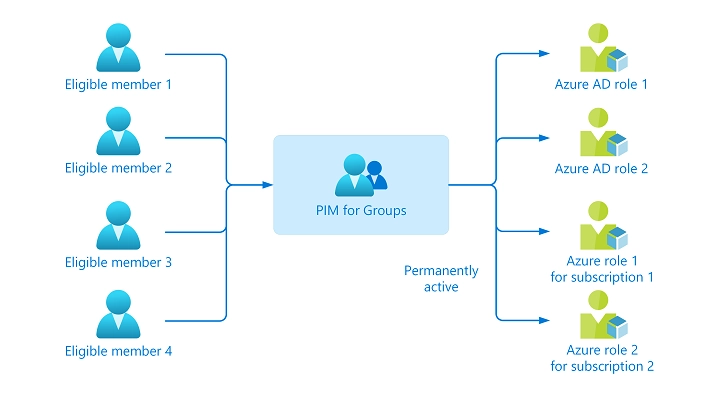
Access Control Lists make administration easier by assigning permissions to groups rather than individual users. For example, an “HR” group can be given read/write access to personnel files, while an “Accounts” group is restricted to financial records. When staff join or leave a team, administrators only need to update their group membership and the correct permissions apply automatically.
This group-based approach reduces the time spent managing permissions across hundreds or thousands of users. It also lowers the chance of human error, as access rules are set once for the group instead of repeatedly for individuals.
More Than Access Control Lists
Many of our clients who use us for Access Control Lists also benefit from a variety of complementary services designed to optimise performance, protect data and support growth.
Explore these additional solutions now to strengthen your IT infrastructure and stay ahead of the curve.

CISO Services
CISO Services provide expert leadership, strategy and governance to strengthen security posture and ensure long-term resilience. We’ve supported organisations in identifying vulnerabilities, implementing effective risk management frameworks and ensuring compliance with industry standards such as ISO 27001 and GDPR.

Multifactor Authentication
Multifactor Authentication (MFA) minimises risks by adding extra proof of identity, ensuring only authorised users gain access to systems.

Vulnerability Scanning
Vulnerability scanning pinpoints hidden flaws in networks, servers and applications that could be exploited by cybercriminals.

Security Training
Security training helps employees recognise and prevent online threats that can compromise business data.
Access Control Lists FAQs
Do you still have questions about Access Control Lists? We’ve answered the most frequent questions that we’re asked below!
What is an Access Control List?
An Access Control List (ACL) is a set of rules that determine which users or groups can access a file, directory or other resource and what level of access (read, write, execute) they have. Each entry in an ACL (often called an Access Control Entry or ACE) associates a user or group with specific permissions for that resource.
In file systems, ACLs extend or replace traditional permission models (like the Unix user/group/other model), allowing more granular control over who may read, modify or execute a file.
On Linux and Unix systems, ACLs are commonly implemented as POSIX ACLs, using commands such as setfacl (to set or modify ACLs) and getfacl (to read them) and they are stored in extended attributes or metadata of the file system.
On Windows, ACLs are part of the NTFS security model: each file or folder has a Discretionary Access Control List (DACL) that describes allowed or denied rights and a System Access Control List (SACL) indicating which kinds of access should be audited (logged).
Because ACLs allow fine-grained permission assignments, they are especially useful in environments where different users need different levels of access to the same resource or where inherited permissions across folder structures are needed while exceptions exist.
How do Access Control Lists work?
An Access Control List (ACL) works by attaching a list of access rules to a resource, such as a file, folder or network object. Each rule, called an Access Control Entry (ACE), identifies a user or group and specifies what type of actions they can perform, such as reading, writing, executing or deleting. When a user attempts to access the resource, the system checks the ACL to decide whether to allow or deny that action.
In Windows, ACLs are part of the NTFS file system. They include two main types: the Discretionary ACL (DACL), which defines what access is permitted or denied and the System ACL (SACL), which specifies what types of access should be audited. For example, a DACL could allow a manager full control over a folder but restrict staff to read-only access. A SACL might log every attempt to change permissions on that folder.
On Linux and Unix, ACLs expand on the basic owner/group/other permission model. Administrators can use tools such as setfacl and getfacl to assign multiple user- or group-specific permissions to a single file or directory. The operating system then evaluates the ACL entries in order to determine whether a given access request should succeed.
ACLs are often combined with inheritance. This means that if an ACL is applied to a directory, its permissions can automatically flow down to subdirectories and files, ensuring consistent rules without requiring manual configuration for each item. This inheritance reduces administrative work while maintaining predictable security.
What is the difference between file permissions and Access Control Lists?
Traditional file permissions, such as those found in Unix and Linux systems, are based on three categories: owner, group and others. Each category can be granted permissions to read, write or execute. While this model is simple and effective, it is limited when more detailed access control is needed. For example, only one group can be assigned to a file, which makes it difficult to provide different rights to multiple groups at the same time.
Access Control Lists (ACLs) expand on this model by allowing permissions to be defined for multiple users and groups individually. Each Access Control Entry (ACE) within an ACL specifies which user or group it applies to and what type of access is permitted or denied. This means that a file can be set so that one group has read-only rights, another group can both read and write and certain individuals may be given full control.
On Windows NTFS systems, ACLs are built-in and form part of the file system’s security model. They allow administrators to set a wide range of permissions, such as modifying attributes, creating subfolders or taking ownership of a file. On Linux, ACLs are supported by many modern file systems and provide similar flexibility through POSIX ACLs.
The key difference is the level of detail and flexibility: file permissions are coarse-grained and simple, while ACLs are fine-grained and more complex. As a result, ACLs are widely used in environments where multiple roles interact with the same files and directories, because they make it possible to tailor access rights much more precisely.
What are the types of Access Control Lists?
Access Control Lists (ACLs) can be divided into several types depending on the system and the purpose they serve. The two most common types in file systems and operating systems are Discretionary Access Control Lists (DACLs) and System Access Control Lists (SACLs). A DACL defines which users and groups are allowed or denied specific actions on a resource. For example, a DACL can allow one group to read a file while denying write access to another. If a resource does not have a DACL, access is usually granted to everyone by default.
A SACL is used for auditing rather than controlling access directly. It specifies which operations on a resource should be logged, such as attempts to modify a file or change its permissions. This auditing function helps administrators monitor activity and detect security incidents. SACLs are commonly seen in Windows environments as part of the NTFS file system.
On Linux and Unix systems, POSIX ACLs are the most common type. They allow administrators to extend traditional permissions by adding multiple user- and group-specific rules. Each rule can grant or restrict actions such as read, write and execute. ACLs on these systems are typically managed with the setfacl and getfacl commands.
In networking and security contexts, ACLs can also refer to packet-filtering rules used in routers and firewalls. However, in the context of file permissions, the focus is on DACLs, SACLs and POSIX ACLs. Each type plays a role in providing detailed access control and, in the case of SACLs, in delivering accountability through auditing.
Why are Access Control Lists important?
Access Control Lists are important because they provide a structured way to protect files, directories and other resources. Without ACLs, organisations would be limited to simple permission models that cannot easily support complex business requirements. By using ACLs, administrators can apply different levels of access to multiple users and groups, ensuring that information is only available to the right people.
From a security perspective, ACLs enforce the principle of least privilege. This means each user has only the access needed to perform their job, reducing the risk of data leaks, accidental deletion or unauthorised changes. In regulated industries, ACLs also help organisations meet compliance requirements by ensuring sensitive data is properly restricted and access can be audited.
Operationally, ACLs make managing permissions more efficient. Group-based permissions mean administrators can configure access for an entire team at once, while inheritance allows consistent rules to apply across directories and subdirectories. This reduces manual effort, minimises errors and keeps systems easier to maintain as organisations grow.
ACLs are also valuable for accountability. With proper auditing, it is possible to log which users accessed or attempted to access specific resources. This transparency supports investigations, helps detect unusual behaviour and builds trust that systems are secure. Together, these features make ACLs a key element of effective information security and IT management.