

NAS Devices
NAS devices provide a centralised storage solution that provides lightening-fast, secure access to files for all authorised users. They allow teams to collaborate efficiently while reducing the risks linked to data loss or hardware failure.
Our NAS device solutions have helped clients overcome issues with limited storage, poor data security and slow network access. When implementing scalable systems, we ensure businesses can expand their storage without service interruptions while benefitting from faster access times, reliable backups and better protection against failures and accidental data deletion.
NAS Devices Made Easy
NAS devices simplify data management by bringing all files into one secure and accessible location. They allow businesses to share, store and back up data without relying on complex infrastructure or expensive cloud subscriptions.
Our NAS deployment services make setup and integration straightforward, reducing downtime and technical frustration and our clients appreciate how quickly their teams can begin using shared storage without specialist training. We configure systems for seamless access, ensuring secure connectivity across offices and remote locations to keep collaboration smooth, easy and dependable.
NAS Devices with ITERTECH
No Subscriptions
Once installed, NAS devices operate without ongoing cloud or software subscription fees. Companies maintain full control over their data, reducing long-term costs while avoiding dependency on external hosting services.
Security
Data stored on a NAS device can benefit from advanced encryption and controlled user permissions. These measures prevent unauthorised access and ensure compliance with data protection standards.

Fast Access
Large files open quickly and transfer smoothly through NAS systems, even across multiple users. This ensures creative teams, engineers and designers can work efficiently without waiting for lengthy downloads or uploads.
Get Started With NAS Devices
Give ITERTECH a call to see if NAS Devices are right for you and your business.

The Technology Behind NAS Devices
RAID and ZFS Architecture
RAID technology forms the foundation of most NAS devices, providing structured redundancy across multiple hard drives. By distributing data blocks and parity information, RAID reduces the risk of total data loss if one or more drives fail. This design balances capacity, speed and protection, giving administrators control over performance profiles suited to their workloads.
ZFS takes this concept further by integrating volume management and file system capabilities into a single framework. Unlike traditional RAID, ZFS verifies data integrity using end-to-end checksums, automatically repairing corrupted files from redundant data copies, providing exceptional resilience for NAS environments handling critical business data.

OS Agnostic
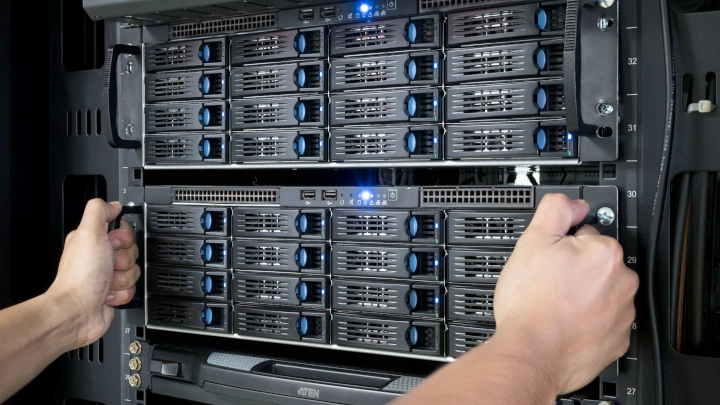
Modern NAS devices are built to operate seamlessly across different operating systems, removing compatibility barriers between users and departments. They use open standards and well-established network protocols to ensure that files are accessible from both Windows and Linux environments. This flexibility allows teams to share, edit and manage data effortlessly, regardless of the platform they prefer.
SMB/CIFS protocols dominate in Windows-based networks, offering smooth file sharing and integration with Active Directory for centralised authentication. These protocols ensure users can access shared drives, manage permissions and sync files as if they were on a local machine. Meanwhile, Linux-based systems rely heavily on NFS, which provides lightweight and efficient file handling suited to large-scale enterprise workloads.
Scalability & Clustering
Scalability is central to modern NAS architecture, allowing storage capacity and performance to expand in step with business growth. Instead of replacing hardware, administrators can add new drives or entire NAS nodes, extending resources without downtime. This modular design supports long-term infrastructure planning and reduces capital expenditure through incremental scaling.
Clustering builds on scalability by linking multiple NAS devices into a single, unified system. This structure distributes workloads intelligently, improving overall throughput and system resilience under heavy use.
For enterprises managing large datasets or high transaction volumes, clustered NAS solutions deliver exceptional flexibility and fault tolerance. They balance storage loads dynamically and allow seamless failover should one node go offline.
More Than NAS Devices
Many of our clients who use NAS Devices also benefit from a variety of complementary services designed to optimise performance, protect data and support growth.
Explore these additional solutions now to strengthen your IT infrastructure and stay ahead of the curve.

IT Support
IT support provides the expertise and rapid response needed to restore systems, secure data and maintain productivity. Through proactive monitoring and fast response times, we’ve reduced downtime and improved efficiency across a wide range of industries.

Endpoint Security
Without strong endpoint security, even a single compromised device can expose sensitive information and disrupt productivity.
Microsoft 365
Don’t deal with inefficiencies and increased costs. See how Migrating to the cloud can transform your business.

Cloud Backup
Businesses of any size can leverage advanced features and provide clients with a professional communication interface.
NAS Devices FAQs
Do you still have questions about NAS Devices? We’ve answered the most frequent questions that we’re asked below!
What is a NAS?
A NAS (Network-Attached Storage) is a data storage device that connects directly to a network, allowing multiple users and systems to access shared files from a single, centralised location. Unlike traditional external hard drives that plug into one computer at a time, NAS devices are designed to serve multiple clients simultaneously. They operate as standalone file servers, with their own processors, memory and operating systems optimised for handling network traffic and file-sharing tasks. This setup makes them ideal for homes, offices and enterprises where collaboration and shared access to data are essential.
NAS devices work using standard network protocols such as SMB/CIFS (commonly used by Windows systems) and NFS (used by Linux and UNIX systems). These protocols allow devices across different operating systems to communicate smoothly, making the NAS accessible to nearly any computer, tablet or smartphone connected to the same network. Some NAS units also support FTP and WebDAV, allowing remote file access over the internet. In essence, the NAS acts as a dedicated hub for storing, managing and retrieving files, without needing constant input from a connected computer.
Internally, NAS devices can contain multiple hard drives arranged in configurations known as RAID arrays. RAID (Redundant Array of Independent Disks) distributes data across drives in a way that balances speed, storage capacity and protection against drive failure. If one drive fails, data can often be rebuilt from the remaining drives, preventing loss of valuable information. The NAS operating system handles this process automatically, making maintenance and data recovery straightforward for users.
Beyond file sharing, modern NAS devices often include additional features like media streaming, automatic backups and cloud synchronisation. They can also host virtual machines, run lightweight applications or serve as a surveillance storage hub. This flexibility makes them suitable for both personal and professional environments, where reliable, accessible and secure storage is crucial.
How does a NAS work?
A NAS (Network-Attached Storage) operates as a dedicated data server within a local or wide area network. It connects to the network using standard Ethernet connections, allowing authorised users and devices to store, retrieve and share data simultaneously. Unlike a typical USB hard drive that attaches to a single computer, a NAS functions independently and remains continuously accessible to anyone with the correct permissions. The NAS system runs its own lightweight operating system, often based on Linux, designed specifically for efficient file management and network performance.
Once connected to the network, NAS devices are assigned an IP address, making it visible to other devices. Users can map shared folders as network drives, so the NAS appears just like a local disk on their computers. File access is managed through standard protocols such as SMB/CIFS (for Windows systems) and NFS (for Linux and macOS systems). These protocols ensure that data can be shared across mixed environments without compatibility issues. Some NAS systems also support secure connections through HTTPS, SFTP or VPNs, enabling remote access while maintaining data privacy.
Internally, NAS devices contain multiple storage drives that can be configured in RAID arrays to balance redundancy and performance. The RAID configuration determines how data is distributed across the drives — for example, RAID 1 mirrors data for protection, while RAID 5 and RAID 6 offer fault tolerance with parity. The NAS operating system manages these arrays automatically, performing error checks and rebuilding data when needed. This self-managing design allows for continuous operation even during drive maintenance or replacement.
NAS devices can also perform additional automated functions beyond simple file storage. They often include built-in services for backups, media streaming and file synchronisation with cloud platforms. Many models integrate with directory services such as Active Directory or LDAP to control user authentication and access rights. This combination of networking, redundancy and automation makes a NAS an efficient and reliable tool for managing and protecting data across an entire organisation or household.
Why is a NAS useful?
A NAS (Network-Attached Storage) is useful because it provides a centralised and efficient way to store organise and share data across multiple users and devices. Instead of keeping files scattered across individual computers or external drives, NAS devices bring everything together in one secure and accessible location. This setup ensures that everyone on the same network—whether at home or in an office—can work from the same version of a file, reducing duplication and confusion. It also makes collaboration easier, as users can upload, download and edit files in real time without needing to send large email attachments or rely on external cloud services.
Data protection is another key reason why NAS devices matter. Most NAS systems use RAID technology, which spreads data across multiple hard drives to provide redundancy. This means that if one drive fails, the data remains safe and accessible until the faulty drive is replaced. Many NAS models also support scheduled backups to external drives or cloud platforms, giving users multiple layers of protection against hardware failure or accidental deletion. Built-in encryption and user permission controls further enhance security, ensuring that only authorised individuals can view or modify sensitive files.
From a business perspective, NAS devices offer scalability and cost efficiency. Storage can be expanded simply by adding new drives or upgrading existing ones, avoiding the need for major infrastructure changes. Because NAS devices are managed locally, companies maintain full control over their data—an advantage in industries where compliance and data sovereignty are critical. For smaller organisations, NAS provides enterprise-level reliability without the complexity or ongoing costs of large-scale storage servers.
In homes, NAS devices are equally valuable for storing photos, videos and personal files in one organised location. They can act as media servers for streaming content to TVs and mobile devices or as backup hubs for family computers and smartphones. Whether in professional or personal use, NAS technology delivers convenience, protection and peace of mind by ensuring that data is always available, secure and easy to manage.
What NAS drives should I use?
Selecting the right drives for a NAS (Network-Attached Storage) system is crucial for maintaining reliability, performance and long-term data security. NAS-optimised drives differ from standard desktop drives because they are designed for continuous operation in multi-drive environments. They feature firmware that manages vibration, heat and power use more effectively, helping prevent premature wear. Using regular consumer drives in NAS devices may work initially, but these drives are not built for 24/7 workloads or RAID recovery processes, increasing the risk of data corruption or early failure.
NAS-specific drives, such as those from the WD Red or Seagate IronWolf ranges, are engineered to handle the demands of constant read and write operations. They often include rotational vibration (RV) sensors, which stabilise performance when multiple drives operate close together. These drives also have higher workload ratings, often exceeding 180–550 terabytes per year, compared to standard desktop drives rated at around 55 terabytes. Additionally, they use advanced error recovery controls to prevent RAID dropouts during rebuilds, ensuring data remains available even when a drive is replaced.
The choice between HDDs and SSDs depends on your usage. Traditional hard disk drives (HDDs) are ideal for bulk storage due to their low cost per terabyte, making them suitable for file backups, archives and large media libraries. Solid-state drives (SSDs), while more expensive, provide superior speed and are often used in NAS devices for caching frequently accessed data. Many NAS units allow mixed configurations, where SSDs serve as cache drives and HDDs handle long-term storage, offering a balance between speed and capacity.
Consistency is also important when building or expanding a NAS. Using identical models—same brand, capacity and firmware—ensures that RAID arrays perform evenly and rebuilds occur smoothly. Mixing drives of different speeds or sizes can create performance bottlenecks and increase recovery times. Always check your NAS manufacturer’s compatibility list to ensure the drives you choose are fully supported. This helps maintain system stability and data integrity, extending the lifespan of both your drives and your NAS system.
Can I use a NAS for cameras?
Yes, a NAS (Network-Attached Storage) can be used to store and manage video recordings from security cameras. Many modern NAS devices include built-in surveillance features that allow them to act as a network video recorder (NVR). This means that IP cameras connected to the same network can save their footage directly to the NAS without the need for a separate recording device. Most NAS platforms, such as Synology, QNAP and Asustor, provide dedicated applications for camera management, motion detection and playback, making it easy to monitor multiple feeds from one central dashboard.
The NAS connects to IP cameras using standard network protocols such as ONVIF, which ensures compatibility with a wide range of camera brands and models. Once connected, NAS devices can record continuously or based on specific triggers, such as movement or sound. Storage requirements depend on the number of cameras, resolution, frame rate and recording duration. For example, high-resolution 4K cameras produce larger files and require greater storage capacity than 1080p cameras. Many NAS systems allow for easy expansion, so users can add additional hard drives as their storage needs grow.
Performance is another important consideration. A NAS used for surveillance must have sufficient processing power and network bandwidth to handle multiple video streams simultaneously. Models with hardware transcoding or dedicated surveillance firmware are ideal, as they reduce CPU load and improve playback quality. Using NAS-optimised drives designed for continuous operation, such as Seagate SkyHawk or WD Purple, helps maintain reliability under constant recording workloads. These drives are engineered for high write endurance and operate efficiently in 24/7 recording environments.
In addition to recording and storage, NAS surveillance software often includes smart monitoring features like motion detection zones, event notifications and timeline-based playback. Users can access live or recorded footage remotely through web browsers or mobile apps, with encryption and authentication protecting against unauthorised access. This makes NAS-based camera storage a scalable and secure alternative to traditional DVR systems, suitable for both home and business security setups.